One web page to drive 25 televisions
Vidio's TV lab has 25 televisions across six operating systems, and during lockdown none of them were reachable. We built the control plane ourselves — and the interesting part is what failed along the way.
- ESP8266
- Arduino
- Raspberry Pi
- Python
- GStreamer
- Janus / WebRTC
- Next.js
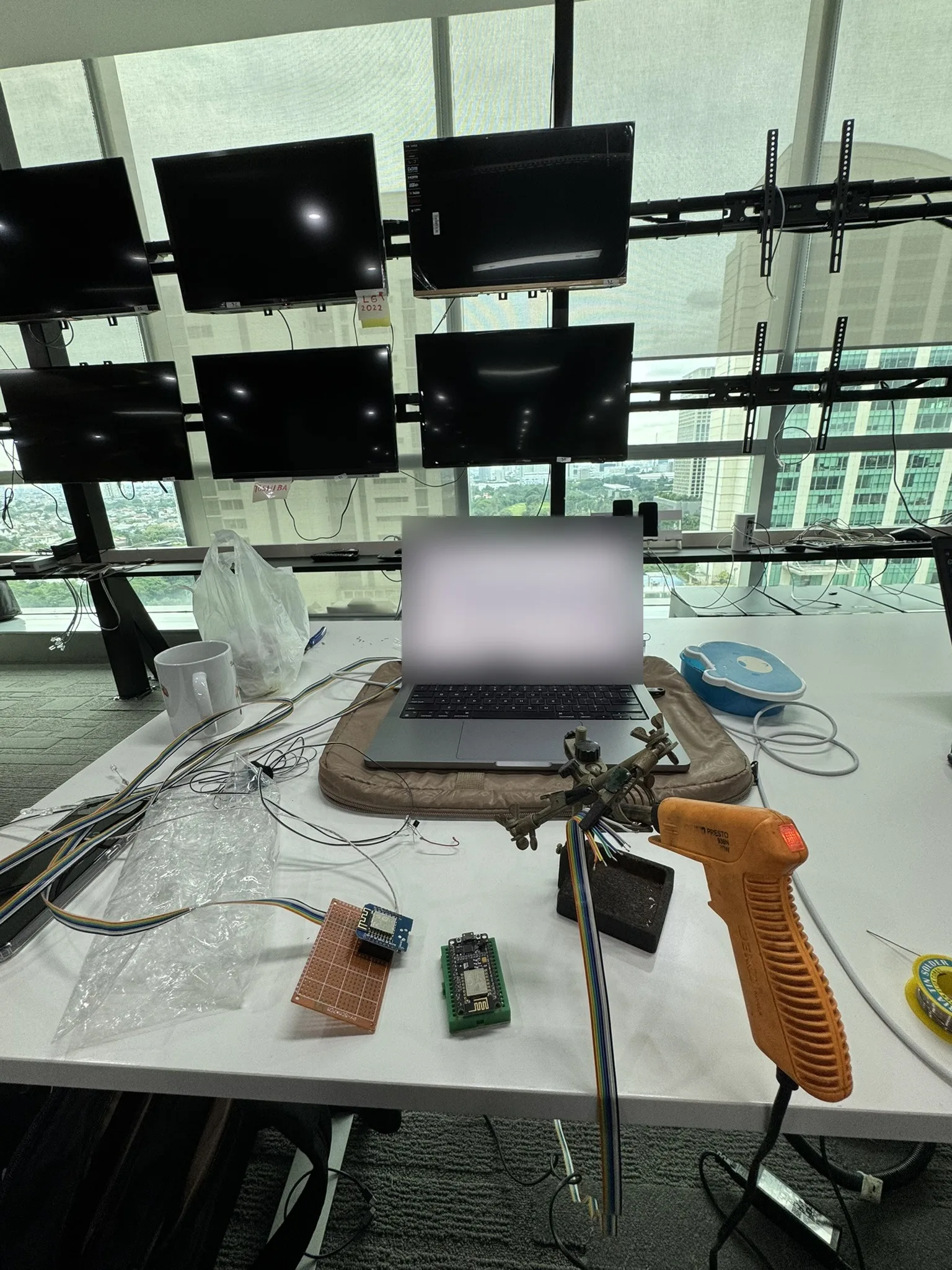
This is the story of access — getting a hand on a television that is on the other side of the city. It is not the story of automated testing on those televisions; that runs on top of what’s described here, and it’s its own case study.
The room
Vidio is Indonesia’s largest streaming service, which means shipping to a lot of screens that are nothing like each other. Our TV lab holds around 25 televisions on custom brackets, and between them they run six different operating systems: Android TV across several vendors, Tizen on Samsung, webOS on LG, VIDAA on Toshiba and Hisense, Whale on Sharp, and Coolita on Coocaa.
That fragmentation is why the televisions have to be physical. Every one of those six platforms has its own app runtime, its own remote-control codes, and its own quirks that only appear on real hardware. No emulator is going to tell you that one vendor’s launcher quietly eats the back button.
Physical televisions have one problem, though: they are in a room. And in 2020 nobody was in the room.
When the office closed
Everyone went home. Getting to a TV meant physically taking one with you — and that worked exactly once per television. Whoever had it could use it; nobody else could. If a developer needed to reproduce something on the Sharp, and the Sharp was in a colleague’s living room, and that colleague was on leave, the work waited.
Work is hybrid now, which makes carrying televisions around permanently unworkable. The requirement settled into one sentence: anyone — engineer, tester, designer — should be able to use any TV, from anywhere, at any time.
Two things have to be true for that. You need to see the screen, and you need to press the buttons. Everything below is those two problems.
Why we couldn’t just buy it
Three ways to get a keypress into a television existed on paper. None survived contact.
Consumer IR blasters. Noticeable delay, no way to express a long press, and closed or awkward APIs. Wrapping one well was more work than building our own.
ADB over the network. Fine on Android TV. Does nothing on a web-engine TV — and those were most of the interesting ones.
A commercial device farm. We actually tried one. Their servers were in Europe, so device control round-tripped at over 500 ms. That is survivable for a click; it is not survivable for a remote, where you press down-down-down-enter and need to watch it land. It also carried a monthly bill for hardware we already owned.
So we built it.
v0, 2020 — get the televisions back in the office
A Raspberry Pi, a webcam, mjpeg-streamer, and a VPN into the office. Every TV came home
from people’s houses. That solved seeing the screen, crudely.
Pressing the buttons came straight off the Pi’s GPIO through LIRC. It worked, and it did not scale — for a reason that had nothing to do with the Pi.
LIRC needs each remote’s IR codes, and at that point I did not know how to decode them myself. So every new television meant searching the internet for somebody who had already published that model’s codes. When nobody had, that TV simply could not be driven. Our device coverage was capped by what strangers had uploaded.
v1, 2021 — the WiFi detour
Two things changed. The Pi ran out of compute once video encoding got serious, so a mini PC took over as orchestrator. And infrared moved off the Pi onto ESP8266 boards programmed through the Arduino IDE.
I chose the ESP8266 specifically because it has WiFi. That was the appeal: boards scattered behind 25 televisions with no wiring to run. I built it that way first.
It was the wrong call, and the office taught me why. The 2.4 GHz band in a busy office building is crowded — dozens of access points, hundreds of devices, and our boards sitting in a metal bracket rack behind a wall of screens. Commands dropped. Not always, which is worse than always: an intermittent remote is a remote nobody trusts, and you stop being able to tell a product bug from a lost keypress.
So I gave up the feature I had picked the chip for, and ran USB serial from the mini PC to the boards instead. The reliability problem disappeared immediately and has not come back.
The other problem was physical. Infrared floods a room, so two televisions on the same bracket 30 cm apart would both act on a single command. The fix is thoroughly unglamorous: put each IR LED directly against that set’s own sensor and tape over it. One LED per television, four channels per board, seven boards for 25 sets.
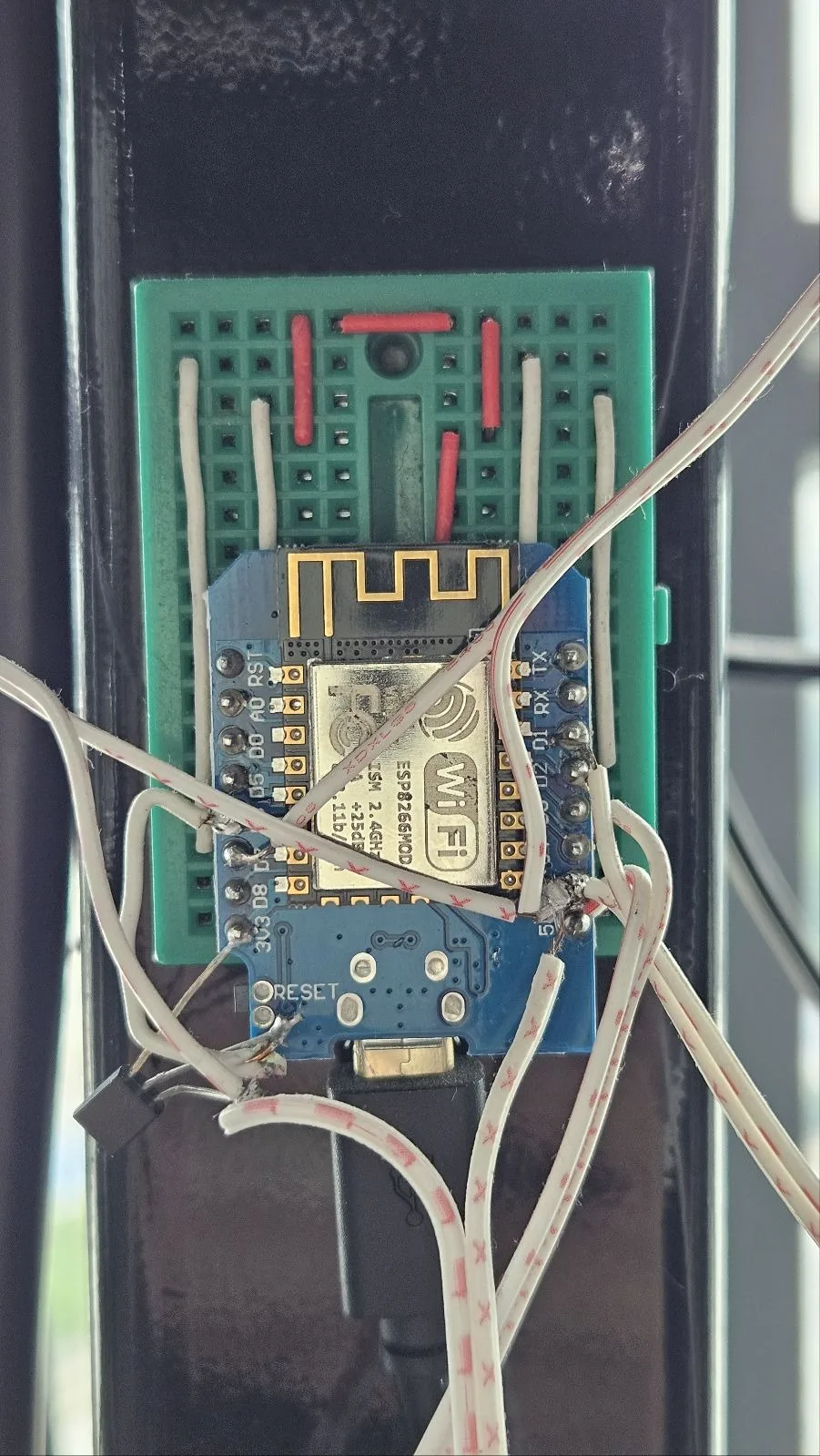
One channel group in production: an ESP8266 on the bracket pole, twisted pair out to the IR LEDs. Hand-soldered, and it has been up for years.
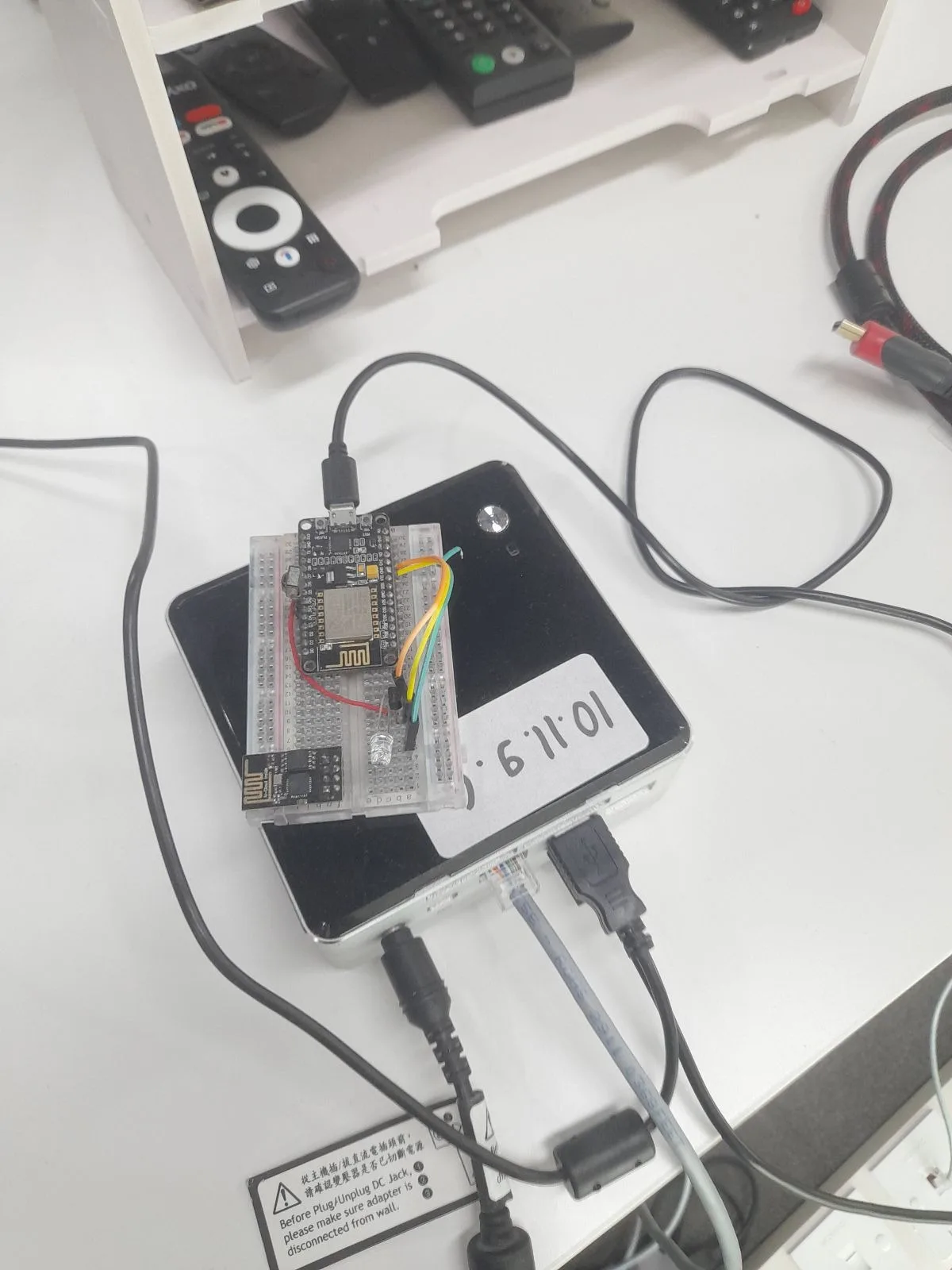
The board and its orchestrator — and on the shelf behind, the rack of physical remotes they replaced.
v2, 2023 — the part people actually see
The front end was rewritten in Next.js. Each television gets a live H.264 view from its group’s webcam, relayed through GStreamer and Janus over WebRTC, sitting next to a virtual remote: power, D-pad, numpad, volume, app exit. Seeing and pressing, in one page.
There is a message box, because two people driving the same TV need to talk to each other. And there is an activity feed, so when an automated run takes a set you can see it happen instead of fighting it for control.
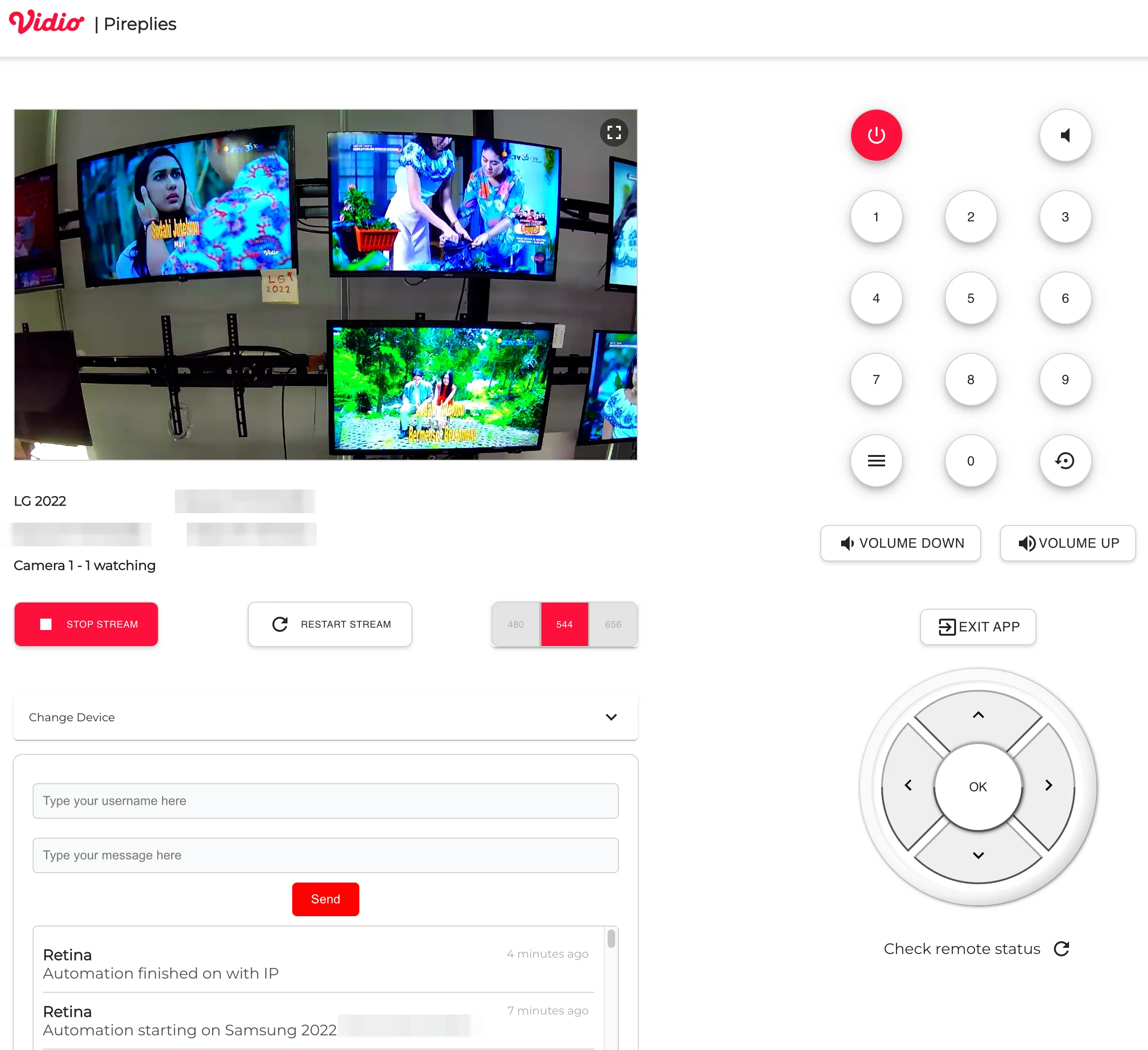
Driving one television. Internal addresses are redacted. The log entry is an automated run announcing itself — same control plane, different caller.
That last detail is the one I’d underline. This is a control plane, and it does not care who is calling. A human clicking a D-pad and an automated suite stepping through a menu go through the same path. We did not build a remote-access tool and later bolt automation onto the side; we built one way to press a button, and everything else is a client of it.
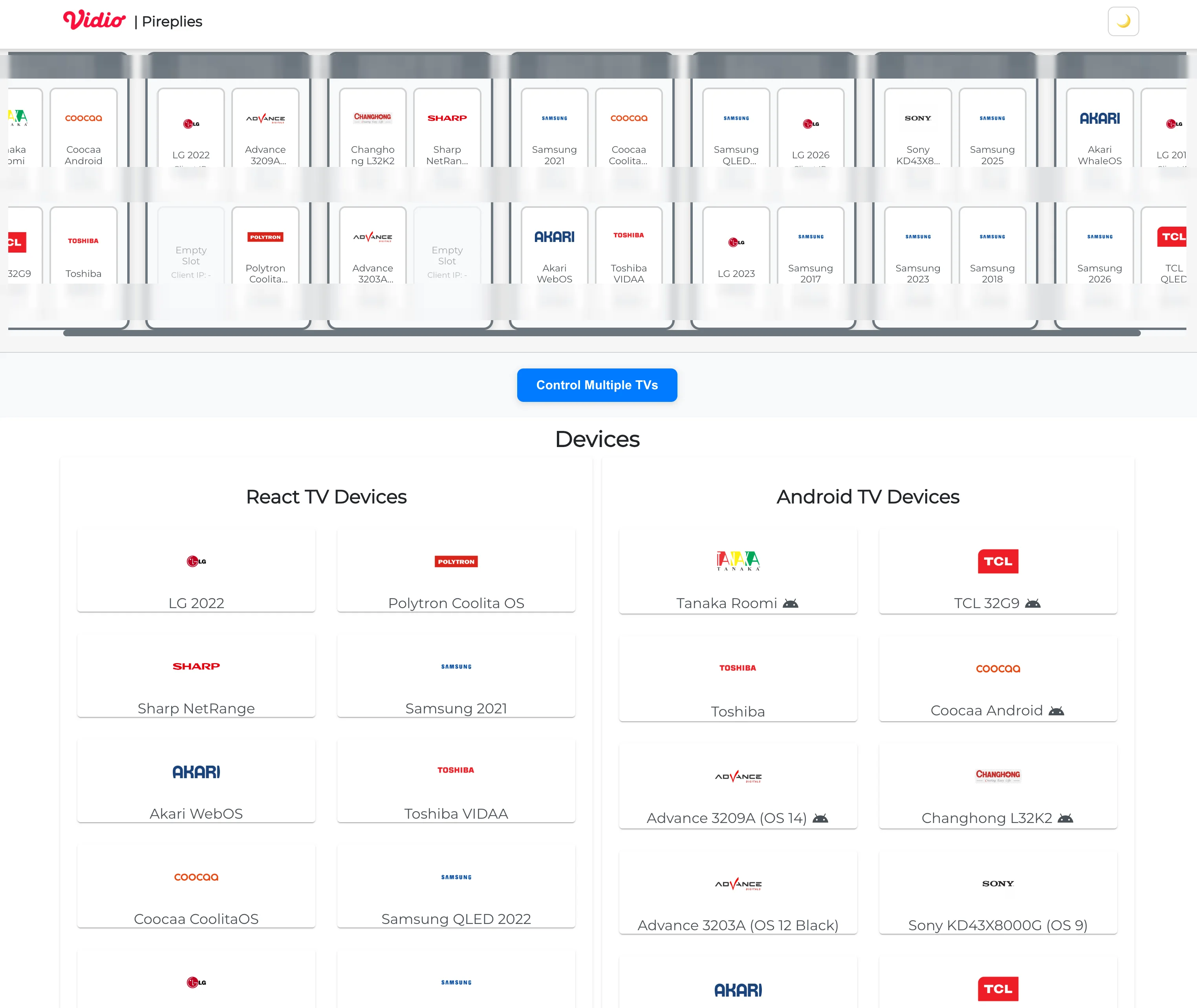
Seven boards, four channels each, 28 slots for 25 televisions. Internal addresses are redacted.
What changed
Before, using a television meant finding whoever had it and waiting for them to be free. If that person was unavailable and the TV mattered, the work slipped.
Now every engineer, tester and designer has all 25 televisions, from anywhere, at any time. No booking, no handover, no “are you using the Samsung?”. The constraint stopped existing.
It has been in production since 2020, through three rewrites, on hardware soldered by hand.
What I’d do differently
Provisioning — and this is the honest weak point, not a modest one.
Bringing up a new group of four televisions is still a manual sequence, and when a board fails, recovery is hand-work. There is no reliable script that takes a bare ESP8266 and a bracket position and produces a working channel. For something this load-bearing, that is the wrong place to be spending human attention.
If I rebuilt it, I would start there: real provisioning, and a per-channel health check that tells me a channel is dead before someone else discovers it. It is also the best argument for finally designing a proper PCB rather than hand-soldering — not because the wiring is difficult, it isn’t, but because identical labelled hardware is dramatically easier to automate the setup of.
Questions about any of this? Reach me on LinkedIn.